

display fullscreen images...
Forum rules
Before asking on how to use a ZDoom feature, read the ZDoom wiki first. This forum is archived - please use this set of forums to ask new questions.
Before asking on how to use a ZDoom feature, read the ZDoom wiki first. This forum is archived - please use this set of forums to ask new questions.
display fullscreen images...
Is there a way to display fullscreen images via script in zdoom? (fullscreen like the images appearing at the end of EP1 or EP3 of Ultimate Doom)

Re: display fullscreen images...
[wiki]HUDMessage[/wiki] and [wiki]SetFont[/wiki] for [wiki]ACS[/wiki] scripts are your friend.
Re: display fullscreen images...
I did it that way, and this is what I got:
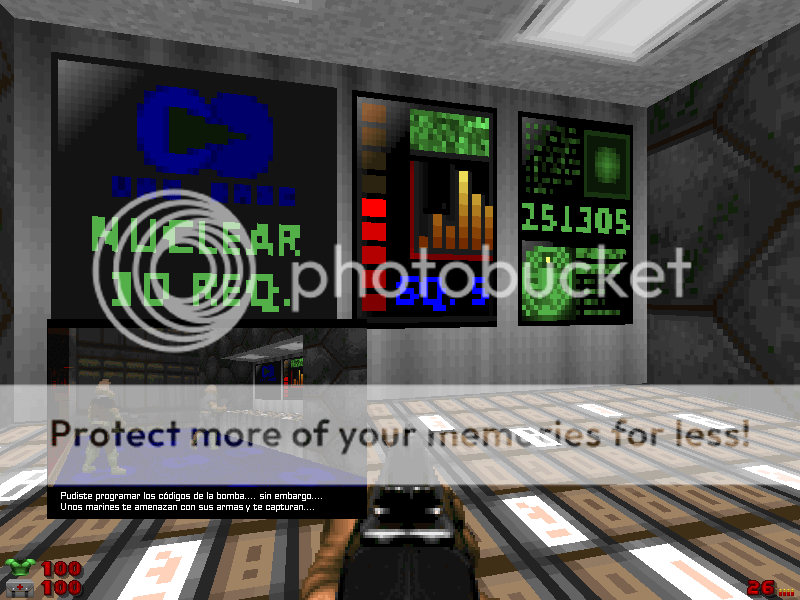
That small screen with the 2 marines was supposed to use the whole screen
help!
That small screen with the 2 marines was supposed to use the whole screen
help!
Last edited by darkwyder on Mon Feb 01, 2010 11:13 pm, edited 1 time in total.
Re: display fullscreen images...
I'm sorry, I forgot to mention that [wiki]SetHUDSize[/wiki] can also be used. Just make the HUD the same size as the image and you'll be golden.
-
CrystalWolf

- Posts: 155
- Joined: Tue May 05, 2009 9:24 pm
- Location: New Orleans, LA
- Contact:
Re: display fullscreen images...
While on the subject, it may be opportune to mention SetPlayerProperty(), specifically to freeze and unfreeze the player if you don't want him moving around while your image is being displayed...