
[minimod][v2.1.0] SoundToScreen

Projects that alter game functions but do not include new maps belong here.
Forum rules
The Projects forums are only for projects. If you are asking questions about a project, either find that project's thread, or start a thread in the General section instead.

Got a cool project idea but nothing else? Put it in the project ideas thread instead!

Projects for any Doom-based engine (especially 3DGE) are perfectly acceptable here too.

Please read the full rules for more details.
Post Reply
User avatar
m8f
 
 
Posts: 1520
Joined: Fri Dec 29, 2017 4:15 am
Preferred Pronouns: He/Him
Location: Siberia (UTC+7)
Contact:

[minimod][v2.1.0] SoundToScreen

Post by m8f »

Image

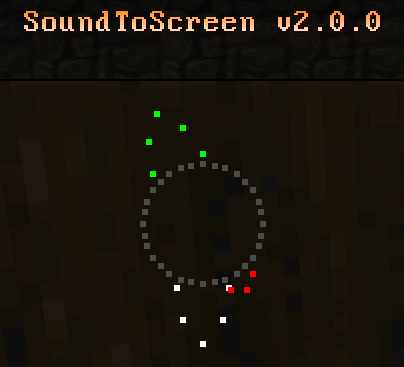
SoundToScreen shows where sounds come from. It may be useful for people who play without sound, with mono sound, or people with hearing impairment.

Engines: UZDoom 4.13.3 and above, LZDoom 4.14.3a and above.

Features
  • Four types of sound: player, noise (harmless), level (doors, elevators), danger (threats).
  • Compatible with old saves.
  • Options to configure looks.
Implementation Notes
  • SoundToScreen won't work if UZDoom is launched with `-nosound`.
Inspiration
Feature suggestions and bug reports are welcome. Playtesting is much appreciated.

Download
This mod is a part of Doom Toolbox.
Last edited by m8f on Sat Aug 08, 2026 12:55 am, edited 9 times in total.
User avatar
m8f
 
 
Posts: 1520
Joined: Fri Dec 29, 2017 4:15 am
Preferred Pronouns: He/Him
Location: Siberia (UTC+7)
Contact:

Re: [minimod][v1.0.0] Sound to Screen

Post by m8f »

Sound to Screen updated. Changelog:

v0.2.0:
  • added displaying moving doors and elevators;
  • made background color overridable;
  • made maximum distance and colors configurable.
v1.0.0:
  • added optional distance display;
  • 0-damage missiles, friendly and dead monster sounds are now considered noise;
  • added an option to disable noise display;
  • disabled sound display on titlemaps;
  • sound display on automap is now optional (off by default).
User avatar
mamaluigisbagel
Posts: 528
Joined: Wed Jul 09, 2014 7:25 pm
Preferred Pronouns: He/Him
Operating System Version (Optional): Windows 11
Graphics Processor: nVidia with Vulkan support

Re: [minimod][v1.0.0] Sound to Screen

Post by mamaluigisbagel »

I don't have hearing problems, but I'm a pathetic multitasker so I miss a lot of important audio like monsters waking up. (hard to hear a monster noise when you have music and a youtube video on at the same time) If I understand right, the middle part is just telling you there's a sound. If an arrow appears when the middle one does, it comes from that side, and if the middle appears but no arrows then its in front?

I love that mods like this exist. I hope they can be put to use for a lot of people that need them.
User avatar
m8f
 
 
Posts: 1520
Joined: Fri Dec 29, 2017 4:15 am
Preferred Pronouns: He/Him
Location: Siberia (UTC+7)
Contact:

Re: [minimod][v1.0.0] Sound to Screen

Post by m8f »

No, it's simpler than that. Left/middle/right parts are independent.

Image

View from tho top: the player is in the center, looking upwards. Sounds in front of him are displayed in the middle, sounds to the left - on the left side, sounds to the right - on the right side. The angle of what is considered front is FOV / 2.
User avatar
mamaluigisbagel
Posts: 528
Joined: Wed Jul 09, 2014 7:25 pm
Preferred Pronouns: He/Him
Operating System Version (Optional): Windows 11
Graphics Processor: nVidia with Vulkan support

Re: [minimod][v1.0.0] Sound to Screen

Post by mamaluigisbagel »

ah I see. When I was testing it I would seem to always get both the arrow and center with the same color, and I wasn't sure if that meant it was coming from a diagonal direction or if it was what I guessed before.
Anim8
Posts: 18
Joined: Sun Dec 26, 2021 11:58 pm

Re: [minimod][v1.0.0] Sound to Screen

Post by Anim8 »

Is there an issue/bug with GZDoom 4.10? (current main release)

The green noise icon shows with safe sounds but the red(white) icon/s isn't appearing with danger noise.

Using older builds of GZDoom seems to work as intended. So thinking something has changed in the newer/current GZDoom builds.

Edit: tried the 4.11 DEV builds and works just fine there.
User avatar
m8f
 
 
Posts: 1520
Joined: Fri Dec 29, 2017 4:15 am
Preferred Pronouns: He/Him
Location: Siberia (UTC+7)
Contact:

Re: [minimod][v2.0.0] SoundToScreen

Post by m8f »

SoundToScreen upgraded to v2.0.0!

It is basically rewritten:
- redesigned UI (see screenshot in the original post)
- revised what sounds to show

Download
User avatar
Spaceman333
Posts: 677
Joined: Thu Oct 13, 2016 8:40 pm

Re: [minimod][v2.0.0] SoundToScreen

Post by Spaceman333 »

Really cool, this could double even as an enemy-radar even for regular playthroughs.
User avatar
m8f
 
 
Posts: 1520
Joined: Fri Dec 29, 2017 4:15 am
Preferred Pronouns: He/Him
Location: Siberia (UTC+7)
Contact:

Re: [minimod][v2.0.1] SoundToScreen

Post by m8f »

Bugfix update: fixed initialization when loaded from a saved game.

https://github.com/mmaulwurff/doom-tool ... v2.0.1.pk3
User avatar
m8f
 
 
Posts: 1520
Joined: Fri Dec 29, 2017 4:15 am
Preferred Pronouns: He/Him
Location: Siberia (UTC+7)
Contact:

Re: [minimod][v2.1.0] SoundToScreen -

Post by m8f »

SoundToScreen updated to v2.1.0!

https://github.com/mmaulwurff/doom-tool ... v2.1.0.pk3

Changelog:
- show player's own sound
- make dots hug screen edges
- add alpha (transparency) slider
Post Reply

Return to “Gameplay Mods”